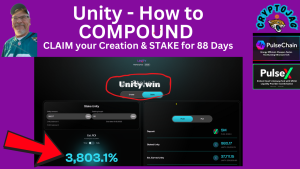
If you’re new to PulseChain or DeFi staking, don’t worry—this guide will walk you through everything step by step. By the end, you’ll understand how to leverage Unity.win’s mechanics to potentially achieve ROIs exceeding 3,000% (based on current pool payouts as of September 2025). Whether you’re a seasoned crypto whale or a curious newcomer, compounding Unity could be your ticket to the “Age of UNITY,” as the community calls it. Let’s dive in.
1. What is Unity.win and Why Does It Matter?
2. Understanding the Creation Process: Your Starting Point
- Add PulseChain network to your wallet: RPC URL is https://rpc.pulsechain.com, Chain ID 369.
You may also bridge or buy PLSX on PulseX (pulsex.com) if needed. Start small—recommend 100-500 PLSX for your first creation to test the waters.
Step 2: Access Unity.win:
- Input your PLS or PLSX amount.
- Confirm the transaction (gas fees are minimal on PulseChain, often under $0.01).
- Your creation is now “maturing.” It becomes claimable after the 1-88 day earning period which you choose. After your cycle ends you have 14 days to claim before invoking penalties so be sure your prompt.
3. Claiming Your Creation: Unlocking the Power
4. Why Claim Promptly?
5. How to Claim (see the video above for illustration)
- Navigate to the “Creations” or “My Positions” section on Unity.win.
- Locate your matured creation. It will show the Unity amount, maturity date, and a “Claim” button.
- Click Claim. This incurs a small gas fee but no additional protocol fee—your Unity tokens are now in your wallet.
- Verify in your wallet: Unity ($UNITY) should appear as a custom token (contract address available on the site or PulseScan explorer).
Pro Tip: As of September 2025, claims are straightforward, with no slippage since it’s a direct mint-to-wallet transfer. Claiming isn’t just retrieval; it’s the spark for compounding. Your fresh Unity is now eligible for staking, where the real yields kick in.
6. Staking for 88 Days: The Compounding Engine
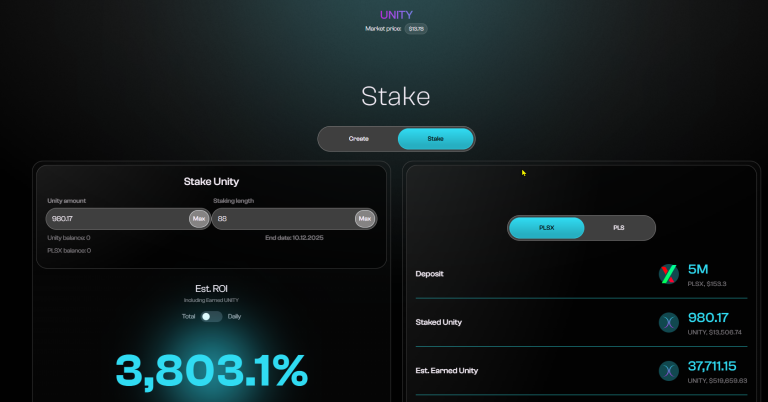
- Deposit Fee: 5% of the stake value in PLS/PLSX. This fee burns PLSX and adds to the pool, creating a flywheel effect.
- Rewards: Daily payouts from the pool, distributed based on your stake duration and size. Current estimates: 3,000%+ APY for full 88-day stakes.
- Early Withdrawal Penalty: If you unstake before 88 days, you forfeit earned rewards (but keep principal). No grace period penalties beyond that—principal is always safe.
- Compounding Loop: Rewards accrue daily but aren’t auto-compounded. Manual claiming and restaking (as we’ll cover) enables true compounding.
7. Step-by-Step Staking Guide
- Prepare Your Unity: Ensure your claimed tokens are in your wallet. If compounding multiple creations, batch them for efficiency.
- Go to Staking Tab: On Unity.win, select “Stake.” Input the Unity amount (start with 50-100% of your claim for aggressive compounding).
- Choose Duration: Slider or dropdown for 1-88 days. Select 88 for maximum rewards—it’s the sweet spot, as shorter stakes dilute your share of the pool.
- Pay the Fee: Approve the 5% PLS/PLSX deposit. This locks your stake and funds the ecosystem.
- Confirm Transaction: Sign with your wallet. Your position now shows in the dashboard with end date and projected earnings.
- Monitor Progress: Use the analytics page (or external tools like TitanX Hub) to track pool size, your share, and burns. Daily payouts are claimable but best left to compound via restaking.
8. The Compounding Strategy: Claim, Stake, Repeat
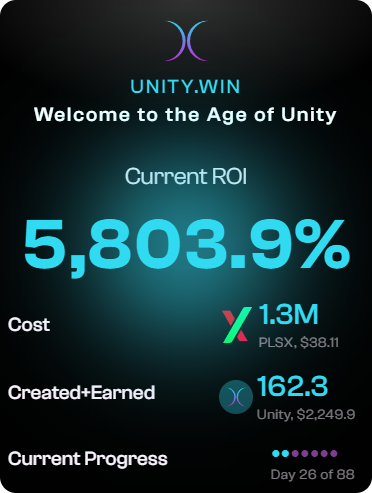
- Cycle 1: Create 1,000 Unity, claim after maturity, stake for 88 days → Earn 5,000 Unity rewards (hypothetical at current ROIs).
- Cycle 2: Claim rewards + principal (6,000 Unity), restake → Earn 30,000 Unity.
- Exponential Growth: Over multiple cycles, your holdings multiply, amplified by PLSX burns that increase Unity’s relative value.
9. Advanced Tips for Max Compounding
- Batch Claims: If you have multiple creations maturing, claim and stake them together to minimize gas. (although gas fees are very minimal on Pulsechain as that is the reason Pulsechain was created in the first place to offset the high Ethereum/Uniswap gas fees).
- Ratio Awareness: Monitor the PLSX:Unity ratio (currently ~674,000:1 but trending toward 100,000:1). Stake when ratios favor Unity appreciation.
- Risk Management: Never stake more than you can lock for 88 days. The protocol is non-custodial, so your keys, your coins—but smart contracts carry inherent risks (audit via PulseScan).
- Community Insights: Join the Telegram (t.me/unitywin) or follow @UNITYdotwinon X for real-time updates. Spaces and AMAs often reveal optimal timing.
- Tax Considerations: In many jurisdictions, staking rewards are taxable events. Track via tools like Koinly for DeFi.
10. Benefits of This Strategy on Unity.win
- Why bother with 88-day compounding? Beyond the eye-popping ROIs:
- Deflationary Edge: Every creation and stake burns PLSX, reducing supply and potentially pumping PulseChain’s ecosystem.
- Passive Wealth Building: Earn while sleeping, in any market. No impermanent loss like in AMMs.
- Community-Driven: Over $888,000 in buy reserves already, ensuring liquidity for exits post-stake.
- Scalability: As PulseChain grows (post-2025 upgrades), Unity’s pool will expand, rewarding early compounders.
Risks and Final Thoughts
Disclaimer: This content is for educational purposes only and is not financial advice. Always do your own research (DYOR).